How to change a visitor’s organization
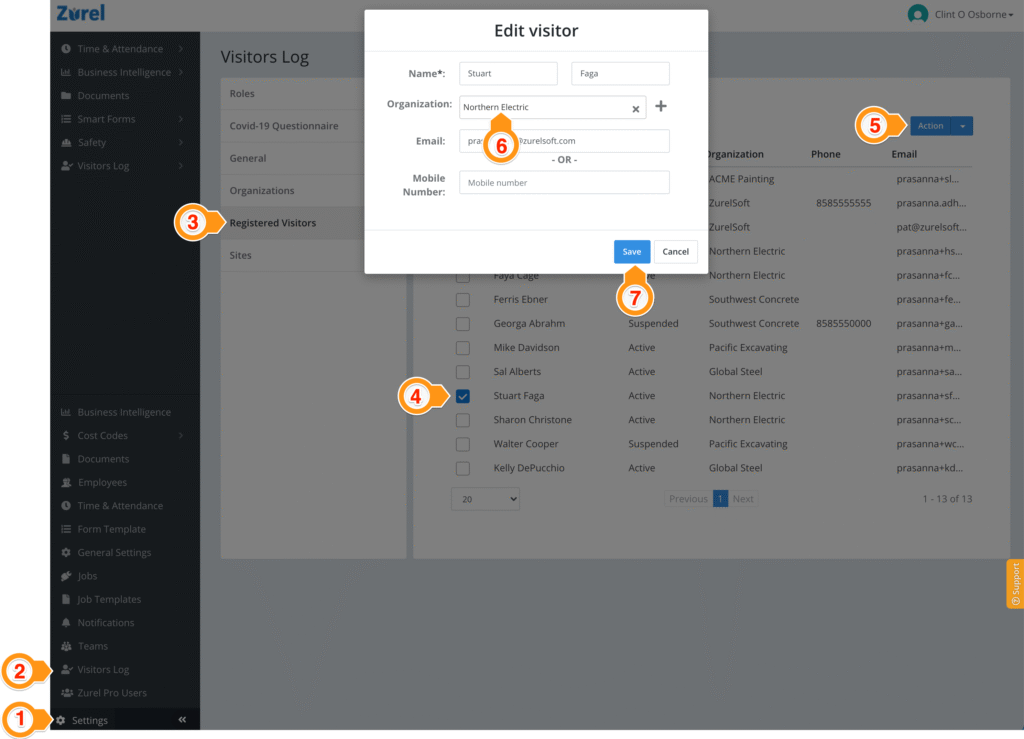
You can change a registered visitor’s organization using the Settings section on the web interface of the Zurel app. Keep in mind that changing registered visitors’ organization does not change their past sign-in records. It changes the visitor’s organization for all future sign-ins. To change a registered visitor’s organization, follow the steps below.
- Select Settings from the left menu of the web interface.
- Select Visitors Log
- Select the Registered Visitors tab (this tab is usually the default selection)
- Select the checkbox next to the visitor you want to edit.
- Select the Action button on the top right and select Edit from its dropdown list.
- Select the new organization.
- Select Save.