
How to create a Generic QR code for a topic
Creating a Generic QR code lets you share your toolbox topics with users from any organization or job. You might want to create one when you want your users to quickly be able to scan a QR code to review a topic.
Platform: Zurel.app (Website)
From the Zurel.app website dashboard, select Settings>Toolbox Talks> Topics & Schedule to navigate to the Topics & Schedule page.
Topics & Schedule
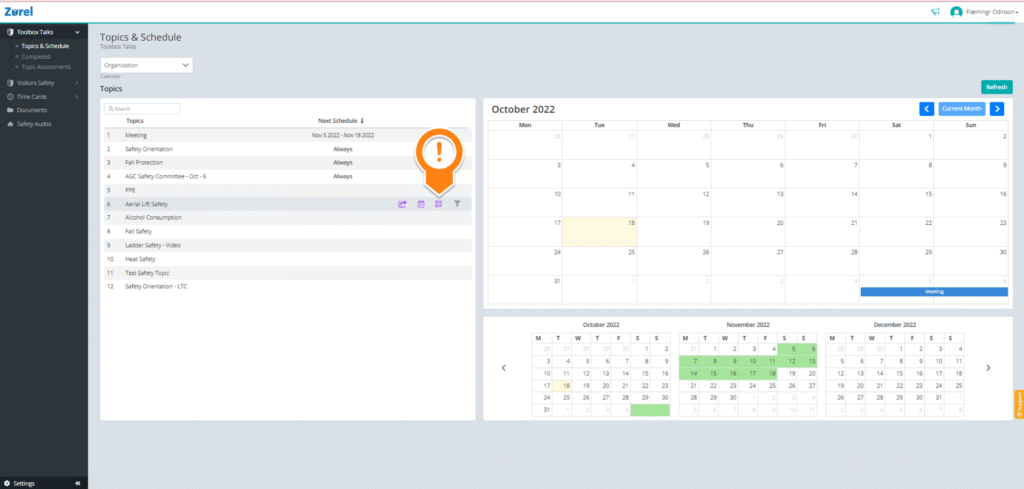
On this page, hover over the topic you want to create a QR code for. Click on the QR code icon that appears to open the Create a QR code window.
Create a QR code
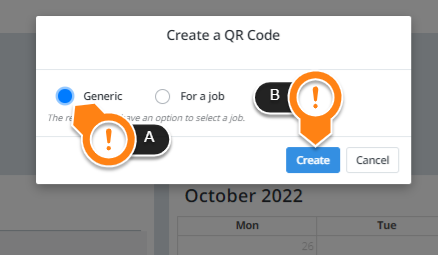
On this window, select Generic (A) and click on Create (B) to generate a generic QR code.