
Hazard Analysis- Web Dashboard
Hazard Analysis-Dashboard lets you see all your hazard analysis activities and manage them. You can also:
- Send the link of blank forms to recipients, which they can use to submit reports.
- Create a new analysis report from this page. [Open the blank form option, from where logged-in users can perform analysis.]
- Access/view the analysis reports submitted by clients and/or by your team (company).
You can navigate to this page by selecting Analysis > Dashboard from the main menu.
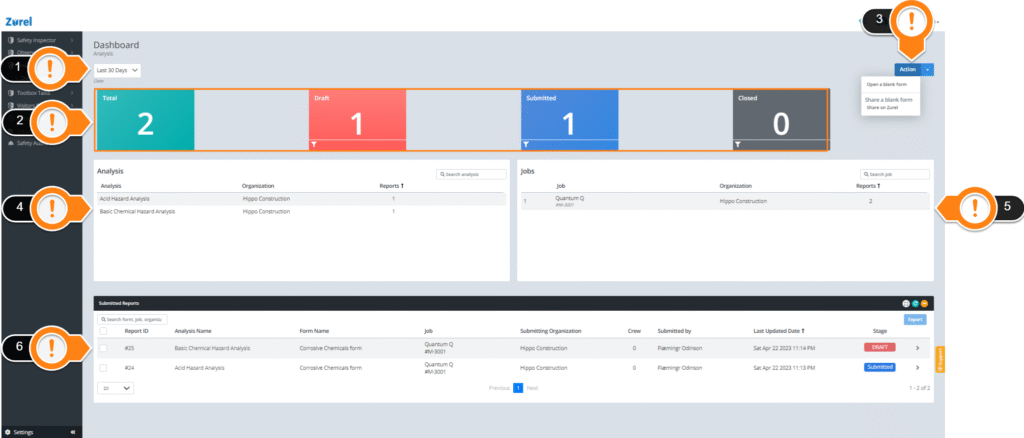
This page has the following items (in the order above):
1. Date
This dropdown lets you filter the content in the dashboard based on the last updated date of the records.
2. Summary Blocks
These blocks show you the number of reports submitted and the stage those reports are in.
3. Action
This button lets you perform the following actions:
- Open a blank form
This action lets you open a blank form from the selection of available hazard analysis forms. Selecting this action opens the Open a blank form window that lets you fill out a blank form. - Share on Zurel
This action lets you share a blank form with other parties who also use Zurel. Selecting this action opens the Share on Zurel window that lets you share a blank form to an organization that also uses Zurel.
4. Analysis
The forms table shows the analysis of which reports have been created. It has the following columns:
- Analysis
The name of the JHA. - Organization
The name of the organization the analysis belongs. - Reports
The number of reports that have been submitted.
5. Jobs
This table shows information about the jobs for which the JHA reports were submitted. It has the following columns:
- Job
The jobs where the reports are from. - Organization
The name of the organization to which the jobs belong. - Reports
The number of reports that have been submitted.
6. Reports
This table lists all the reports. It has the following columns:
This table lists all the reports. It has the following columns:
- Report ID
The identification number of the report. - Analysis
The name of the analysis the report was made. - Form Name
The name of the form the analysis was based. - Job
The job the report is submitted. - Submitting Organization
The organization that created the report. - Crew
The number of crew members who reviewed the report. - Submitted by
The name of the person who submitted the report. - Last Updated Date
The date when the report was last updated. - Stage
The stage of the report.
To learn more about the stages, see the Analysis Report page guide.
You can select the reports using the checkboxes beside each report. Selecting any report activates the Export button on the top right of this table, which lets you download the report in PDF format.
Clicking on any report opens the Analysis Report page.