
Hazard Analysis Form Preview
Analysis – Analysis Form page allows you to add or edit Job Hazard Analysis (JHA) forms.
You can navigate to this by selecting a form or clicking the Add New button in the Analysis Forms page.
Zurel users with the Analysis Admin and JHA Manager roles can add and edit JHA forms.
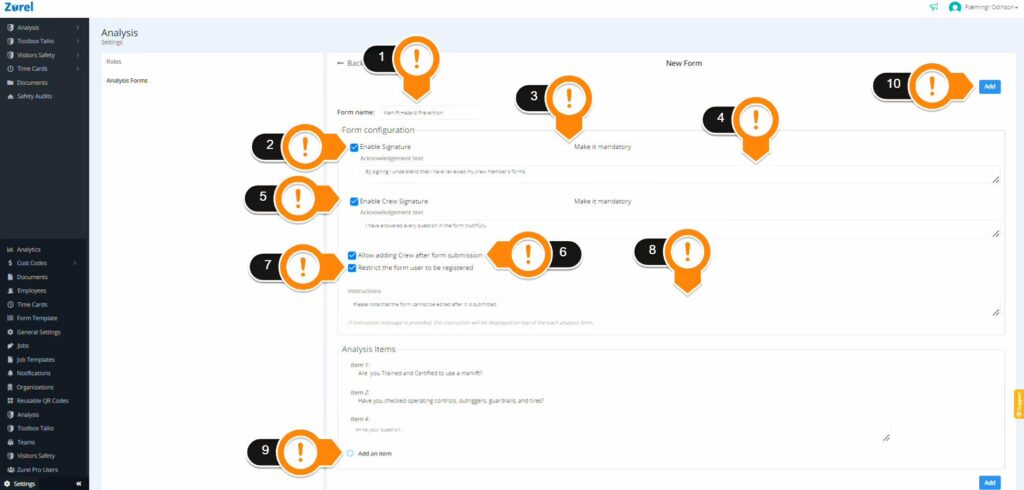
The JHA Form page has the following items (as labeled above):
1. Form Name
Enter the name of your form here.
2. Enable Signature
You may want the submitter of the report to sign the report before submitting. You can enable the submitter’s signature on a report by checking this box. If enabled, a signature panel appears when submitting the form. You can make the signature mandatory by selecting the “Make it Mandatory” check box.
3. Enable Crew Signature
You may also want crew members to sign the report. You can enable the crew’s signature on a report by checking this box. If enabled, a signature panel appears when submitting the form. You can make the signature mandatory by selecting the “Make it Mandatory” check box.
4. Acknowledgement text
You may want the submitter of a report to read an acknowledgment before submitting a report. Use this field for the acknowledgment texts you want the submitter to review. If provided, the texts appear above the submitter’s signature panel along with a check box for the submitter to select.
5. Allow adding Crew after form submission
Enable this checkbox to allow report submitters to add crew members after the report has already been submitted.
6. Restrict the form user to be registered
Enable the Restrict the form user to be registered checkbox when you want to make sure the form submitter is registered in the Zurel app.
7. Instructions
Add text into the Instructions box to display instructions on top of your analysis form.
8. (+) Add an Item
The Add an Item button lets you add analysis items to your form. Click this button to add more questions to your form.
9. Add
This button lets you add your hazard analysis form to the Analysis Forms page.
To find out more about the Analysis Forms page, click here.