
Hazard Analysis List
Analysis – Analysis lists all the analyses that have been created for the account and lets you modify them. Here you can also:
1. Create new analyses.
2. Create and print QR codes for analysis.
3. Modify the details of an analysis or delete it.
To navigate to this page, go to: Settings > Analysis > Analysis
Zurel users with the Analysis Admin and JHA Manager roles can create and edit analysis data.
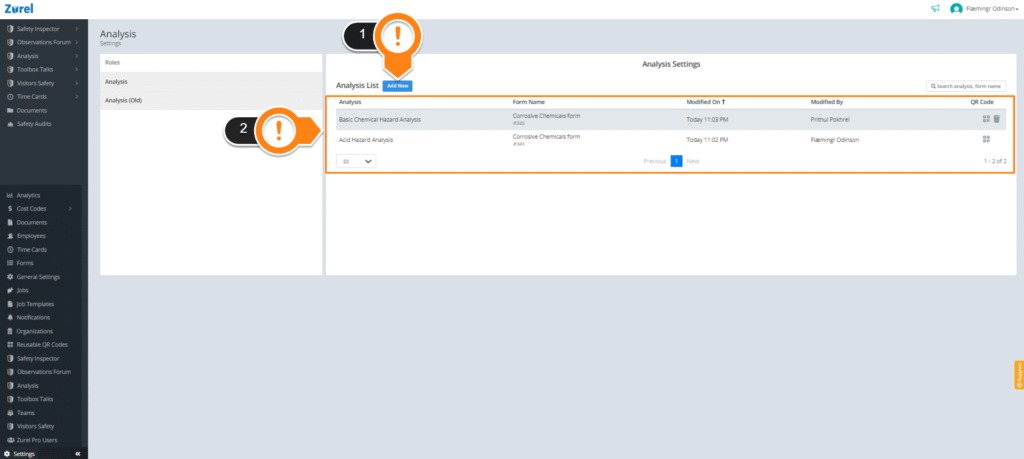
This page has the following items (in the order above):
1. Add New
This button lets you create new analysis data.
For more information on creating analysis data, click here.
2. Analysis List
This list has the names and the details of pre-existing analyses that can be modified or shared with your users. It has the following columns:
- Analysis
The name of the analysis. - Form Name
The name of the analysis form that is being used for the analysis. - Modified On
The latest date on which the details of the analysis were modified. - Modified By
The name of the user who made the latest modification to the analysis. - QR Code
The QR Code can be scanned to create analysis reports. - Delete Button
The button that lets you delete the analysis. This button only appears when you hover over a row in the analysis list.