
Safety Inspector- Roles
Safety Inspector – The Roles page allows you to assign various safety inspection roles to Zurel Pro users. You can assign these roles to your users to give them different privileges. The privileges that are available to each role are listed in the Role’s Privileges section of this page.
Role settings can only be accessed by Admins.
You can navigate to this page from the Zurel web app root menu by selecting Settings > Safety Inspector> Roles.
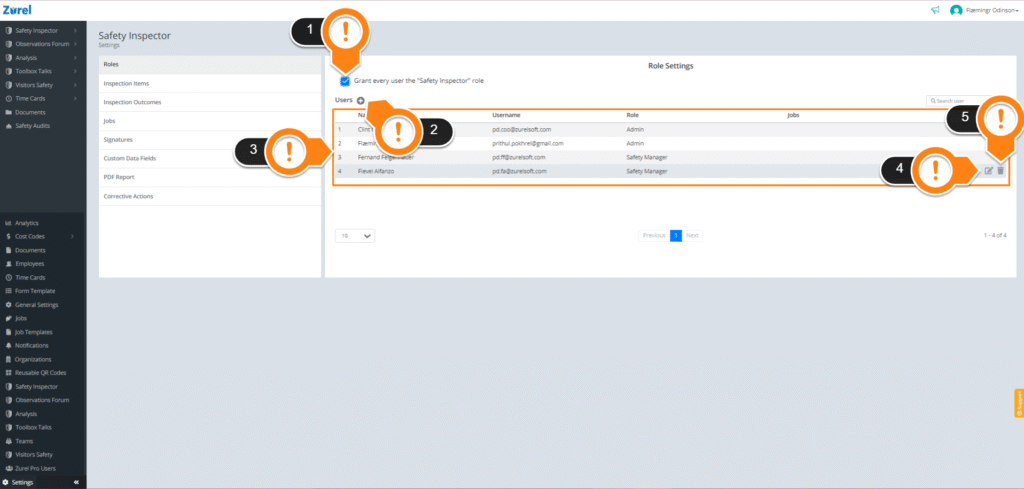
This page has the following items (as labeled above):
1. Grant every user the “Safety Inspector” role
Selecting this checkbox grants your users the Safety Inspector role. This role allows every Zurel user to create inspection reports.
2. + (Add)
The + button lets you give roles to your users. Clicking on the button opens the Add a User Role window.
3. Roles List
The Roles List lists details for the users who have been assigned roles. It has the following columns:
- Name
The name of the user. - Username
The email address of the user. - Role
The role assigned to the user. A user can have multiple roles at once. - Jobs
The Jobs that the user has been assigned to. Whenever inspection reports are submitted for those jobs, the user will receive a push notification on their mobile about them. Multiple jobs assigned to the same user are separated by a comma.
4. Edit Icon
The Edit icon only appears when you hover over a row on the Roles List. Clicking on this icon lets you edit user roles and jobs.
5. Delete Icon
The Delete icon also appears when you hover over a row. Clicking on the Delete icon lets you delete a user role permanently.
Add a User Role
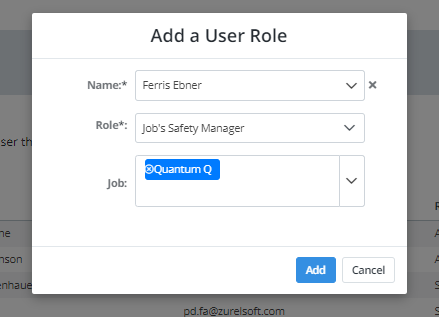
The Add a User Role window appears when you click the + button. You need to use this window to give roles to your users. You can manually type or use the dropdowns to find:
- Name
The name of your user. - Role
The role you want to give to the user. - Job
The job you want to assign to your user.
Roles Privilege
| Feature | Admin | Safety Manager | Job’s Safety Manager |
|---|---|---|---|
| Zurel Web App | |||
| Access Safety Inspector Dashboard | Yes | Yes | YesOnly for the Jobs they are assigned |
| Zurel PRO app | |||
| Access Safety Inspector Dashboard | Yes | Yes | Yes |
| Settings | |||
| Roles | Yes | No | No |
| Inspection Outcomes | Yes | No | No |
| Job Settings | Yes | No | No |
| Custom Data Fields | Yes | No | No |
| Yes, only for the Jobs they are assigned |