
How to schedule a toolbox talks meeting
Scheduling a toolbox talks meeting makes it visible to your team on the Zurel Calendar. Topics and required materials appear automatically on your team’s mobile apps on days the meetings are scheduled. You will need to schedule a meeting to host it.
Platform: Zurel.app (Website)
From the Zurel.app website dashboard, select Settings>Toolbox Talks> Topics & Schedule to navigate to the Topics & Schedule page.
Topics & Schedule
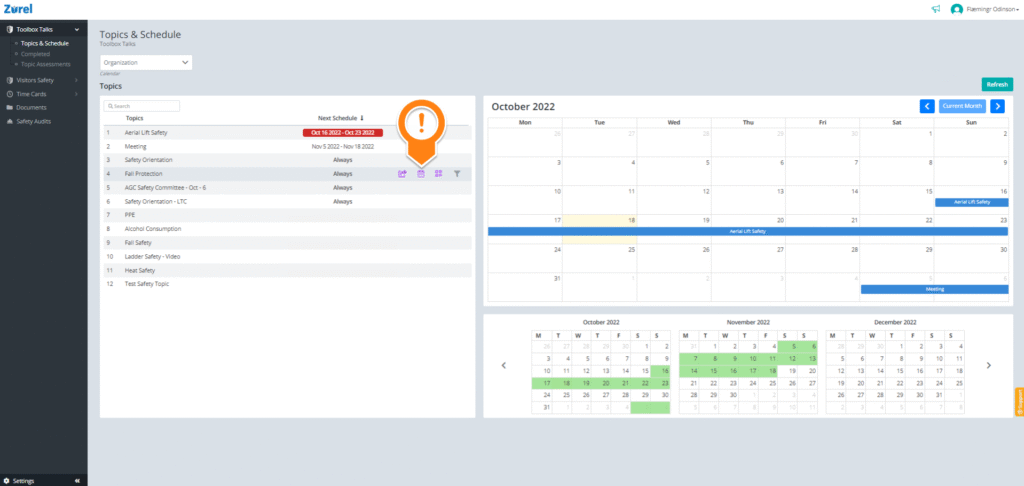
On this page, hover over the topic you want to schedule a meeting for. Then, click on the calendar icon that appears. Clicking on this icon opens the Schedule window.
Schedule
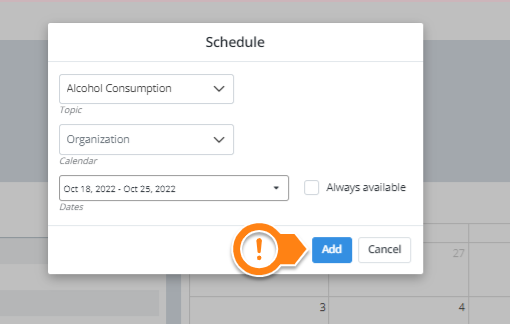
Click on Add after you have finished filling in the details.