
How to give roles to users
Roles provide different privileges to your Zurel Pro users. You might need to give your users roles for them to access special features like shared observations, crew’s observations, assigning roles to other users, adding toolbox topics, and hosting meetings. To assign roles, you need the Toolbox Talks Admin or Manager role.
Platform: Zurel.app (Website)
From the Zurel.app website dashboard, select Settings>Toolbox Talks> Roles to navigate to the Roles Settings page.
Toolbox Talks
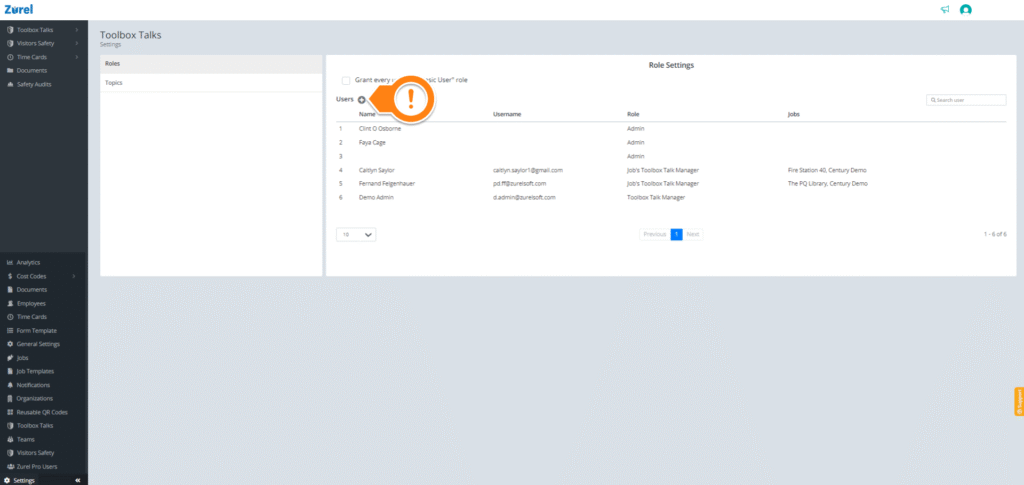
On this page, click on the + button beside Users, which opens the Add a User Role window.
Add a User Role
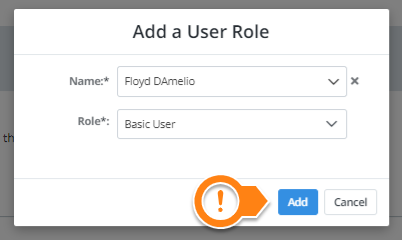
Click on Add to give your user a role.