
Equipment Inspection Report Preview Page
Safety Inspector – Equipment Inspection Report lets you view the details of individual safety inspection reports. Here, you can also share, edit, close, or delete the report depending on the stage of the report.
You can navigate to this page by clicking on any report from the Inspection Reports table on the Equipment Inspections dashboard.
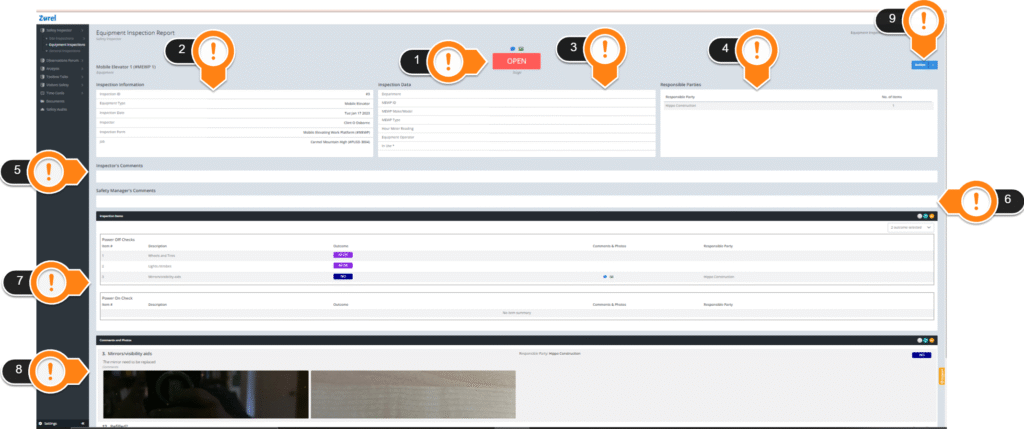
This page has the following items (In the order above)
1. Stage
This item lets you know the stage the report is in. A report can be in the open, closed, or submitted stage.
- Open
A report in the open stage can be edited by the observer. - Submitted
A report in the submitted stage can be closed, reopened, and deleted by a safety inspector. - Closed
A report in the closed stage can’t be edited or reopened.
A report in the closed stage can’t be edited or reopened.
Clicking on the icons above the stage will redirect you to attachments and comments.
2. Inspection Information
This item lists basic information about the inspection.
- Inspection ID
The number you can use to identify the inspection report. - Equipment Type
The name of the equipment the report is about. - Inspection Date
The date of when the inspection was done. - Inspector
The name of the inspector who inspected the equipment. - Inspection Form
The name of the form used for the inspection. - Job
The name of the job site where the equipment was inspected.
3. Inspection Data
This item displays data fields that have been added by the user in the Inspection form.
4. Responsible Parties
This item lists the name of the organization that is selected as a responsible party of an item or sub-items in the Inspection Report.
- Responsible Party
The name of the organization. - No. of items
The items for which the organization has been selected as a responsible party.
5. Inspector’s Comment
This item displays any comment made by the inspector on the inspection report.
6. Safety Manager’s Comment
This item displays comments made by the safety manager on the inspection report.
7. Inspection Items
This list displays all the items that were inspected and details of the inspection. It has the following columns:
- Item #
The number of the item. - Description
The full name of the item or its description. - Outcome
The outcome of the inspection on that item. - Comment & Photos
The comments made by the inspector on the item, along with any photos. - Responsible Party
The name of the organization that has been selected as the responsible party for an item.
8. Comments and Photos
This item displays the comments and photos made on the inspection in detail.
9. Action Button
This item lets you edit, delete, close, or download a PDF of an inspection report depending on the stage the report is in.