
How to edit a toolbox talks schedule
Editing a toolbox schedule lets you change its topic, organization calendar, and date. You might sometimes need to edit a schedule to host it on a different date, location, or under a different name.
Platform: Zurel.app (Website)
From the Zurel.app website dashboard, select Settings>Toolbox Talks> Topics & Schedule to navigate to the Topics & Schedule page.
Topics & Schedule
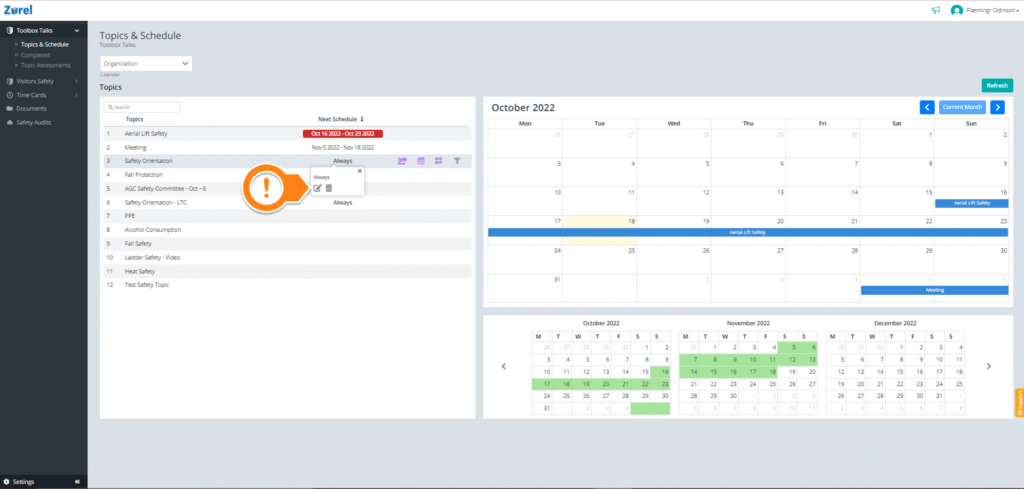
On this page, hover over the Next Schedule column of the topic you want to edit. Click on the Edit icon to open the Schedule window, where you can change the details of your toolbox topic.
Schedule
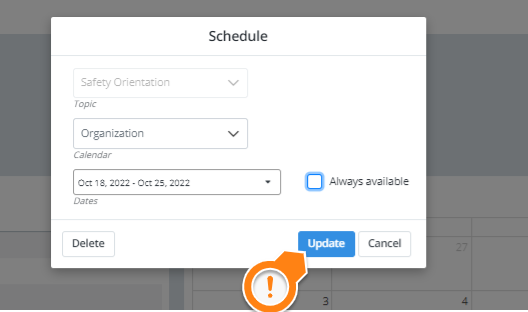
Click on Update after you have finished editing your topic.