
How to enable host signature for my training forms
Enabling the host’s signature on your toolbox topics makes it mandatory for your host to sign their meeting forms. You need to enable the host’s signature in your topic when you want your host to sign a toolbox topic form. You can also add an acknowledgement that gets displayed on the signature panel. To make the host’s signature mandatory for a topic, you need the Toolbox Talks Admin or Manager role.
Platform: Zurel.app (Website)
From the Zurel.app website dashboard, select Settings>Toolbox Talks> Topics to navigate to the List of Topics page.
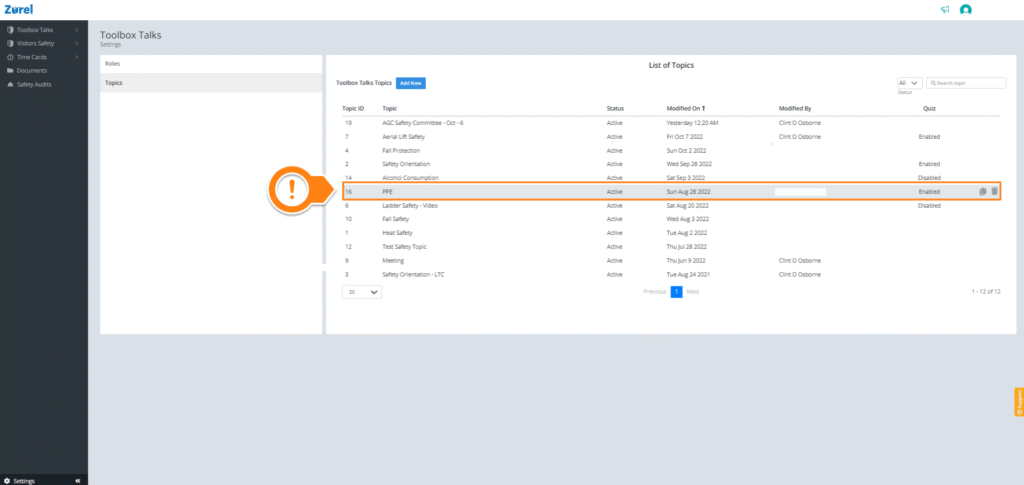
After the List of Topics page opens, select any topic. Selecting a topic opens the Topic Content page.
Topic Content
On the Topic Content page, find Require Signature and check the Host (A) box under it.
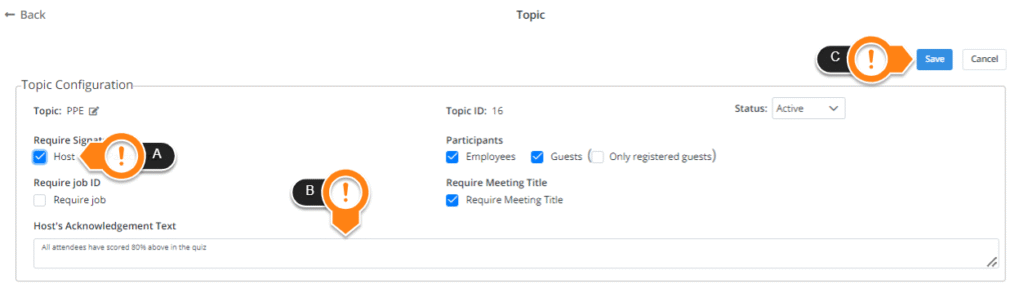
The acknowledgment text, along with a checkbox next to it, gets displayed on the signature panel when you type your text into Host’s Acknowledgement Text (B).
When you are done, click on Save (C). Your topic will now have the host’s signature enabled and mandatory.