
How to make a toolbox talks meeting always available
A toolbox talk meeting that has always been made available can be hosted anytime. You might sometimes need to make the topic always available for meetings so it can be hosted anytime for ad hoc meetings or for training new employees.
Platform: Zurel.app (Website)
From the Zurel.app website dashboard, select Settings>Toolbox Talks> Topics & Schedule to navigate to the Topics & Schedule page.
Topics & Schedule
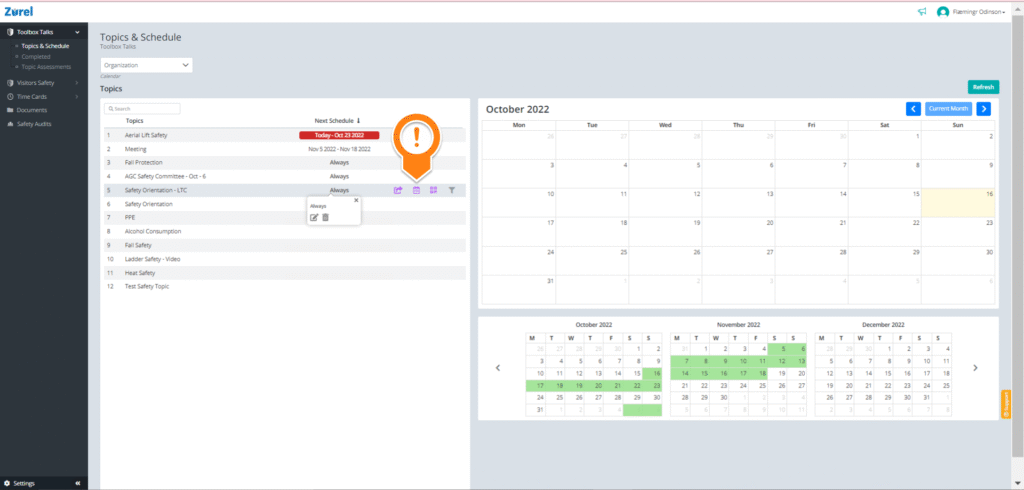
On this page, hover over the topic and click on the calendar icon to open the Schedule window.
Schedule
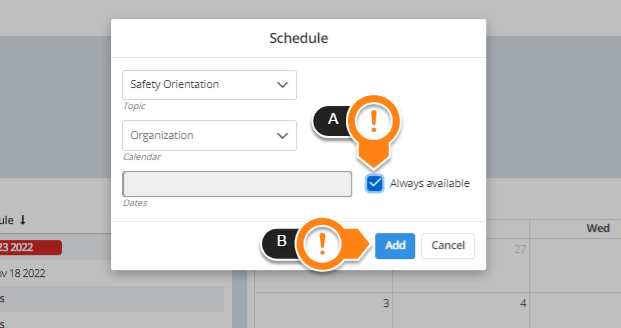
On this window, tick the Always available(A) box and Add(B) to make your topic always available for meetings.