
How to make a topic available to employees
Making a toolbox topic available to employees lets you and your Job Managers share a toolbox topic to employees. You need to make a topic available to employees when you want employees to attend meetings for the topic or want them to review your topic. To make a toolbox topic available to employees, you need the Toolbox Talks Admin or Manager role. If you have a Job Manager role, you can only view the List of Topics page.
Platform: Zurel.app (Website)
From the Zurel.app website dashboard, select Settings>Toolbox Talks> Topics to navigate to the List of Topics page.
Safety Toolbox Talks
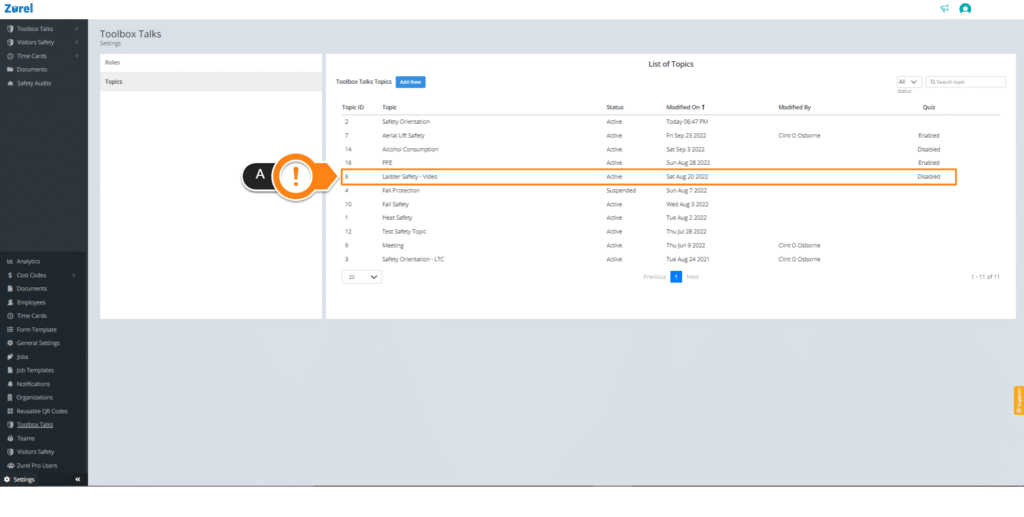
After the List of Topics page opens, select any topic (A). Selecting a topic opens the Topic page.
Topic
On the Topic page, find Participants and check the Employees (A) box under it. If you want your toolbox topic to be only available to employees, uncheck every other box except for the Employees checkbox.
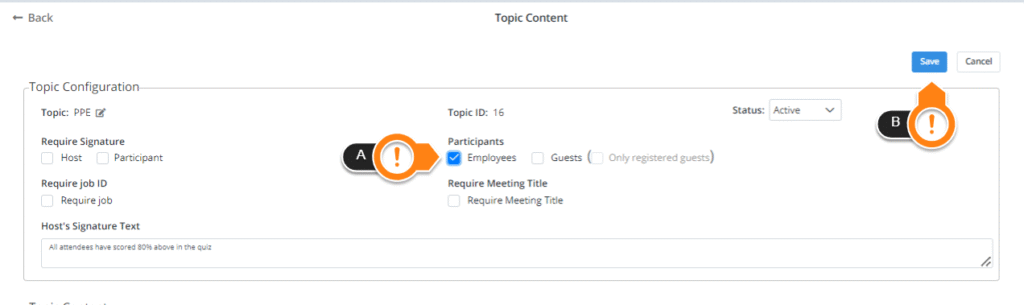
After checking the box, click on Save (B) to save your changes. The topic should now be available to your employees.