
How to make “meeting title” mandatory
When you make Meeting Title mandatory, the hosts of your toolbox meetings have to enter a title for the meeting before submitting it. You might need to make the meeting title mandatory in your training forms when you want to differentiate between two toolbox topics with the same name.
Platform: Zurel.app (Website)
From the Zurel.app website dashboard, select Settings>Toolbox Talks> Topics to navigate to the List of Topics page.
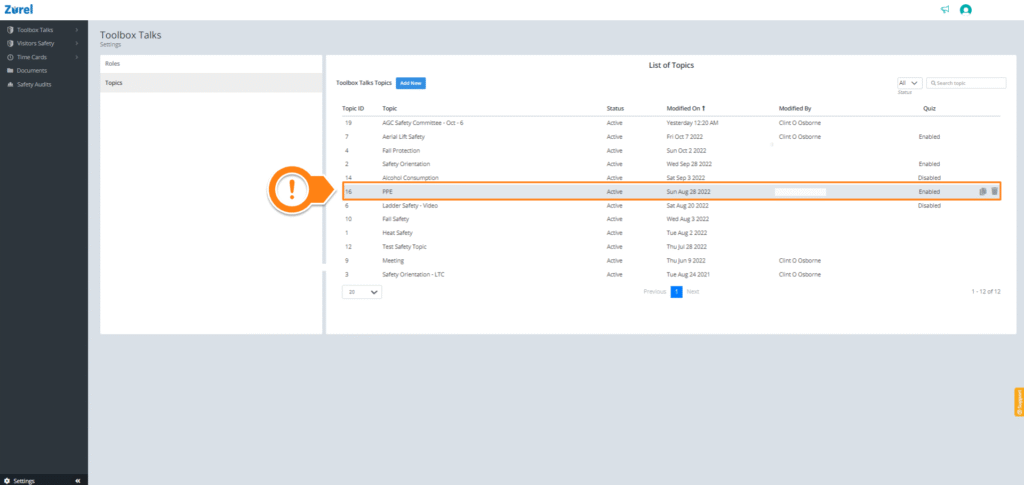
On the List of Topics page, select any topic. Selecting a topic opens the Topic Content page.
Topic Content
On the Topic Content page, find Require Meeting Title and check the Require Meeting Title (A) box under it.
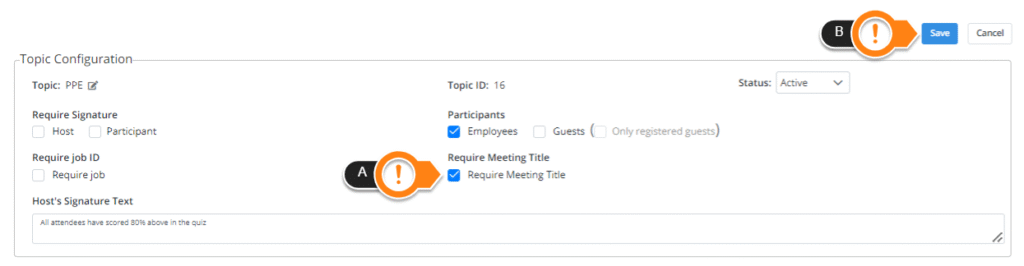
When you are done, click on Save (B).
Your toolbox topic form will now require the host to add a meeting title before it is submitted.