
SI-Custom Data Fields
Safety Inspector – Custom Data Fields page lets you add additional information to inspection forms. This information can be filled out and saved with the form.
Custom Data Fields can only be accessed by Admins and Safety Managers.
You can navigate to this page from the Zurel web app root menu by selecting:
Settings > Safety Inspector>Safety Inspection Items > Custom Data Fields.
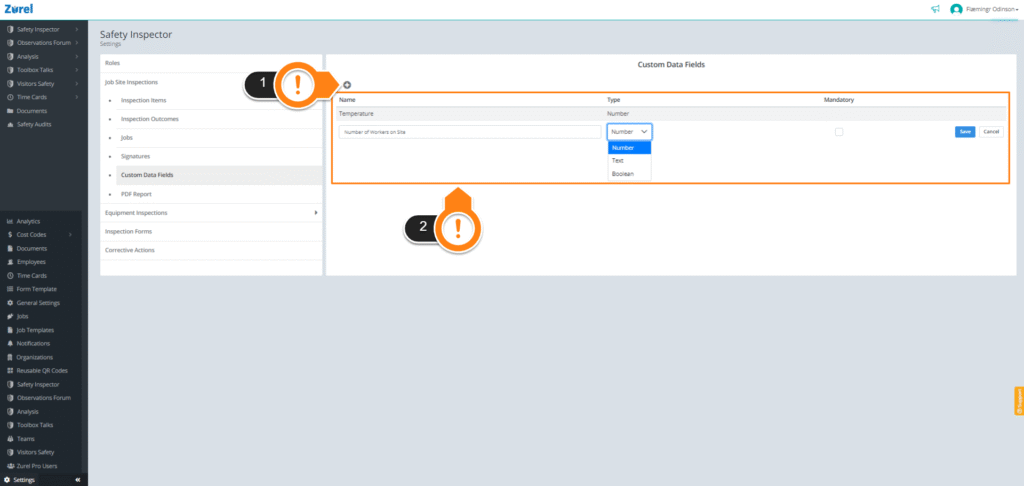
This page has the following items (as labeled above):
1.+ (Add button)
The + button lets you add additional information fields to the information table.
2. Inspection Information Table
The inspection information table contains the list of additional information that can be added to inspection forms. This table has the following columns:
- Name
The name of the information field. - Type
The type of the field. There are three types of information fields you can add:
Number: Any numbers (1,1.1,2,2.5,3,4,…)
Text: Any text
Boolean: Data that only has two values (Yes/No)
3. Mandatory
The Mandatory checkbox makes filling the information field mandatory for the safety inspector. Select it to make sure your form can’t be submitted without filling in this field.