
SI-Equipment Types
Safety Inspector – Equipment Types page lists categories of equipment and lets you add new equipment types.
Equipment Types can only be accessed by Admin and Safety Managers.
You can navigate to this page from the Zurel web app root menu by selecting Settings > Safety Inspector> Equipment Inspections > Equipment Types.
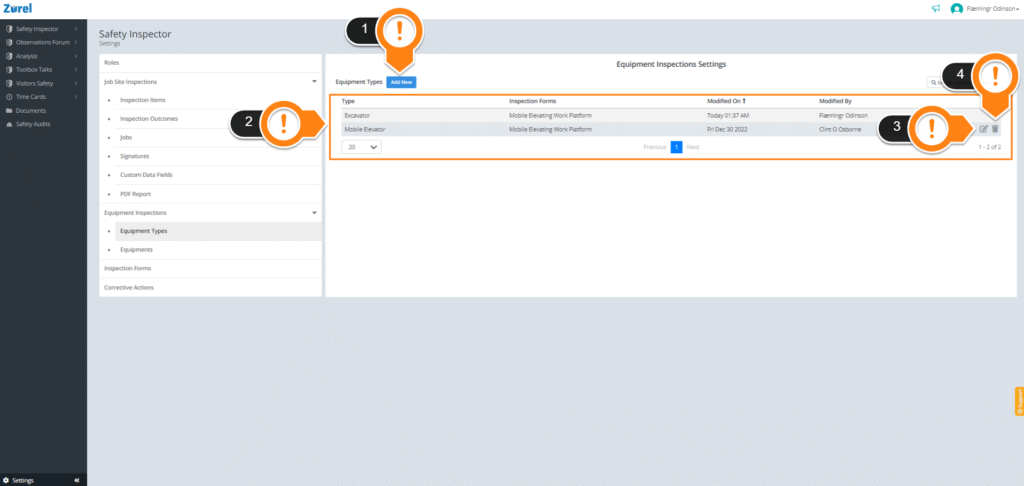
This page has the following items (as labeled above):
1. Add New
This button lets you add new equipment types. Clicking on it opens the Add an Equipment Type Window. This window lets you enter the equipment name and select an equipment form.
2. Equipment Type List
This item lists available equipment types. It has the following columns:
- Type
The name of the equipment category. - Inspection Forms
The inspection forms are associated with the equipment types. Each equipment type can have multiple inspection forms that can be used during the equipment inspections. - Modified On
The last date when the details of the equipment type were modified. - Modified By
The name of the person who modified the equipment type last.
3. Edit Button
This button lets you edit the details of the types.
4. Delete Button
This button lets you delete equipment types permanently.