
Toolbox Talks Dashboard Guide
Toolbox Talks-Toolbox Talks dashboard displays information about completed toolbox topics. This is also where you can find and download PDF records of those meetings or self-guided trainings.
You can access this page by selecting Toolbox Talks > Toolbox Talks from the main menu.
The completed page looks like the attachment below:
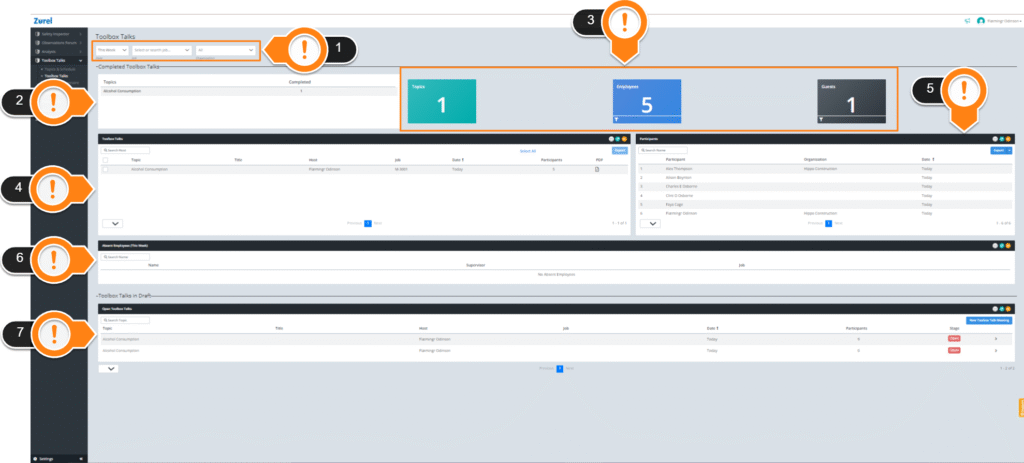
His page has the following items (labeled in the picture above):
- Filter
The Filter filters the whole dashboard. - Date
The date of the meeting. - Job
The assigned job of the attendees.
2. Topics List
The Topics List shows all the topics that were completed. This list has the following columns:
- Topics
The names of toolbox talks.
The names of toolbox talks.
- Completed
The number of toolbox trainings completed under a certain topic.
The number of toolbox trainings completed under a certain topic.
3. Summary Blocks
The Summary Blocks give you a summary of the most important information on the dashboard:
The Summary Blocks give you a summary of the most important information on the dashboard:
- Employees
The number of employees who completed the toolbox talks training. - Topics
The number of topics that were completed. - Guests
The number of guests who attended and completed the training.
4. Toolbox Talks
The Toolbox Talks table lists all the completed toolbox trainings. This includes toolbox talk meetings as well as solo topic reviews. It has the following columns:
- Topic
The name of the toolbox talk topic. - Title
The title for hosted meetings is the host’s provided one. - Host
The names of the hosts for toolbox meetings. For solo review, this column says “Self”. - Job
The name of the job site. Only if this information were provided. - Date
The date when the meeting/review was completed. - Participants
The number of participants that attended the meeting, excluding the host for hosted training.
You can view or download filled meeting forms by clicking on the PDF icons. You can also download multiple forms at once by selecting them and clicking the Export button.
Along with columns, the Toolbox Talks table also has the following utility items that make it easier for you to navigate this table:
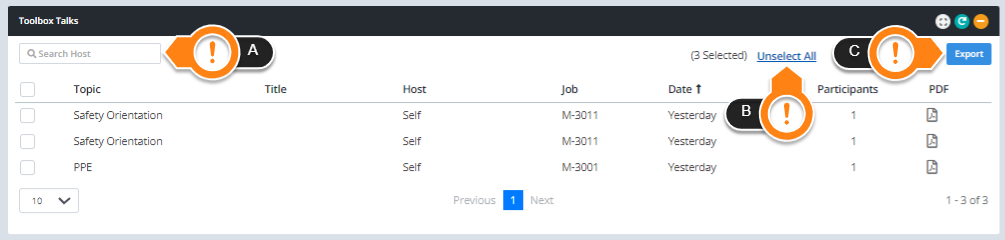
A. Search
The Search box at the top left corner of the Toolbox Talks table lets you search for toolbox talks topics manually.
B. Select all
The blue Select all button in this table selects all the Toolbox Talks topics and makes them ready for Export.
C. Export
The Export button lets you export and download the details of each toolbox talk meeting.
5. Participants
The Participants table lists all the individuals who completed toolbox meetings or solo reviews of the toolbox topics. This list has the following columns:
- Participants
The names of the participants who attended the toolbox talks meeting. - Organization
The name of the organization the participant belongs. - Date
The date of the meeting or solo review.
Like the Toolbox Talks table, the Participants table also has a Search box and an Export button.
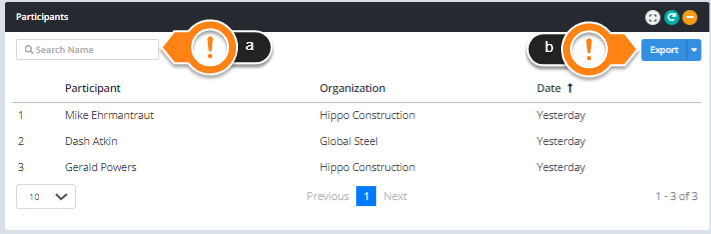
These items let you:
a. Search
Search for any participant manually by name.
b. Export
Export the data in the table into CSV or PDF files and let you download them.
6. Absent Employees(This Week)
The List of Absent Employees item lists the names of the employees who were on the timecard records for the selected week but did not participate in any toolbox talk. This table has the following columns.
- Name
The name of the absent employee. - Supervisor
The name of the supervisor is based on employees’ time cards. - Job
The job of the absent employee.
7. Open Toolbox Talks
The Open Toolbox Talks table lists all the toolbox talks in the DRAFT stage. These toolbox talks haven’t been submitted or closed. This table has the following columns:
- Topic
The name of the toolbox topic. - Title
The title of the meeting. - Host
The name of the meeting host. - Job
The name of the job. - Date
The date when the toolbox talk was created. - Participants
The number of participants who attended the meeting. - Stage
The stage of the toolbox talk is in.
The stage of the toolbox talk is in.
Clicking on any row of this table opens the toolbox talk in preview mode.