
Copy a Project Documents into a Single Trade Workspace with Inheritance
This guide explains how to copy one existing project document into a specific Trade Workspace while keeping inheritance enabled. This allows you to manage shared standard content in one parent document while maintaining trade-specific versions that automatically stay aligned.
Steps:
- Go to Projects in the Bid Packages workspace.
- Open the project that contains the document you want to copy.
- Scroll down to the Trade Workspaces section.
Each workspace represents a trade-specific bid package within the project. - In the Trade Workspaces section, click the blue Actions dropdown in the top-right corner.
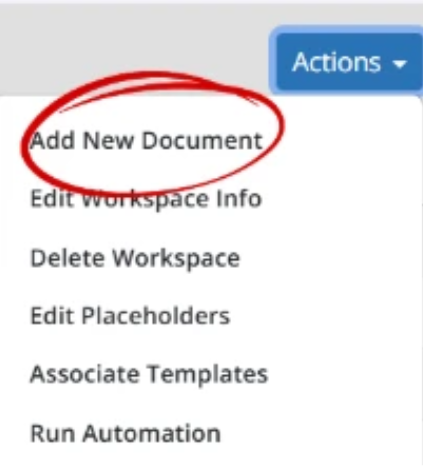
- Select Add New Document as shown in the image above.
The Add New Document window will open. - Choose Copy an existing document.
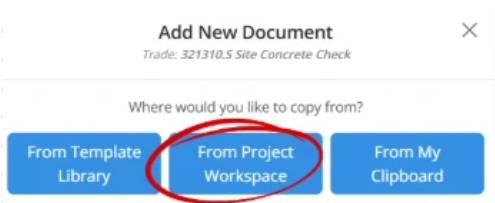
- Select From Project Workspace as shown in the image above.
- A list of all project documents will appear. You can:
- Use Filter By to narrow the list.
- Use the Search bar to quickly locate specific documents.
- Select the document you want to copy.
- Make sure Keep Inheritance remains checked.
This ensures the new document stays linked to the original parent document. - Click Add.
The document will begin copying and display Processing… next to its name. - Click Refresh until processing is complete.
Once processing finishes:
- The new document will appear at the top of the Trade Workspace list.

- An Inheritance icon will display next to the document name, confirming that inheritance is active just like image above.
💡 Tip:
- If the document still shows Processing…, click Refresh after a few seconds until the document finishes loading.
- The most recently copied document will appear at the top of the Trade Workspace list, making it easy to find right after processing completes.
BP-062