
List of Topics Guide
Toolbox Talks- List of Topics page lists the available toolbox talk topics and lets you edit, copy, or add new topics.
This list can be edited by Toolbox Admin and Toolbox Managers.
You can reach this page from the root menu by selecting: Settings > Toolbox Talks > Topics.
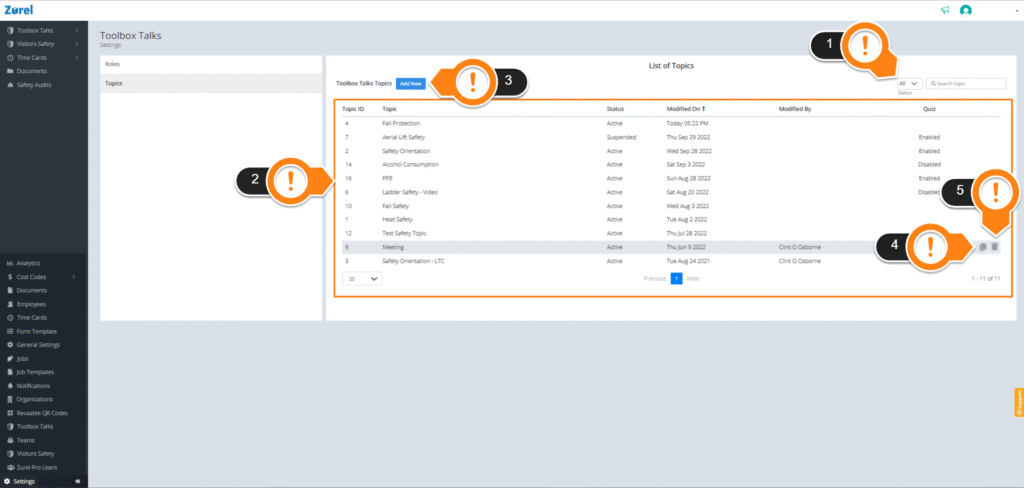
This page has the following items (as labeled in the screenshot above):
1. Status Filter:
The Status Filter filters what is listed on the Topics List (Item 2) according to the status. The status of a topic can be Active or Suspended. The All filter lists both Suspended and Active topics on the Topics List.
2. Topics List:
The Topics List displays every active toolbox topic. This list has the following columns:
- Topic ID
The number that the topic is identified with.
- Topic
The name of the toolbox topics.
- Status
The status of the topics. See the Topic Content & Configuration Guide for more information on the Status of a topic.
- Modified On
The date when the topic was last modified.
- Modified By
The name of the latest user who modified the toolbox topic.
- Quiz
The status of the topics quiz, if it has one.
3. Add New button:
The Add New button lets you add new topics. Clicking on this button launches the Topic page, where you enter details about your toolbox talks topic.
4. Duplicate Icon:
The Duplicate icon only appears when you hover your mouse over a row in the Topics List. Clicking this icon creates a duplicate copy of the topics.
5. Delete Icon:
The Delete icon also appears when you hover your mouse over a row in the Topics List. The Delete Icon lets you delete Topics from the Topics List.