
Observations Dashboard
Observations Forum – Observation Dashboard displays all essential information about submitted observations, like issue types, responsible parties, and the stages of the observation reports. You can also view and download the reports from this page.
Observation managers, Job’s managers, and Admins can view and filter all the observations submitted to their Zurel account on this page.
You can navigate to this page from the Zurel web app root menu by selecting Observations Forum> Dashboard
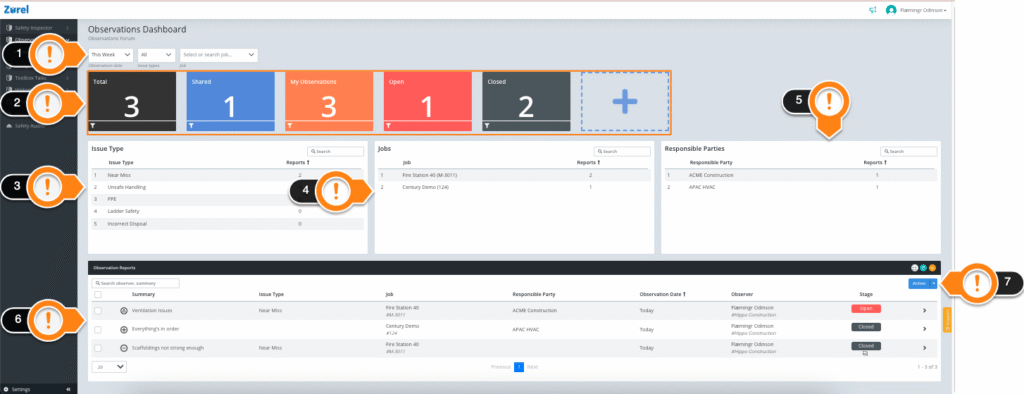
This page has the following items(as labeled above):
1. Filter
This item lets you filter the whole dashboard based on:
- Observation Date
The date of observation. - Issue Types
The issue type. - Job
The job site.
2. Summary Blocks
This item gives you a summary of the most important information on the dashboard. You can also add more summary blocks according to your needs by clicking the + summary block. The following summary blocks can be added to the observations dashboard:
- Total
The total number of observations. - Shared
The total number of observation reports that have been shared in the forum. - My Observations
The total number of observations you have made. - Open
The total number of observation reports in the Open stage. - Closed
The total number of observation reports in the Closed stage. - Positive
The total number of Positive observation type reports submitted. - Negative
The total number of Negative observation type reports submitted. - Neutral
The total number of Neutral observation type reports submitted. - Change
The total number of Change observation type reports submitted.
3. Issue Type
This table shows you the issue types that have appeared in the observations. This table has the following columns:
- Issue Type
The name of the issue type. - Reports
The number of reports with that issue type.
4. Jobs
This table shows you the jobs the observation is from. This table has the following columns:
- Job
The name of the job site. - Reports
The number of reports submitted from that job.
5. Responsible Party
This table shows you the responsible parties that are supposed to address the observations and issues. This table has the following columns.
- Responsible Party
The name of the responsible party. - Reports
The number of observation reports submitted by that responsible party.
6. Observation Reports
This table shows you the observation reports that were submitted. This table has the following columns:
- Summary
The summary of the observation report. This summary is based on the observation type of the report. - Issue Type
The type of issue for this observation is made. - Job
The job for which the observation is made. - Responsible Party
The organization is responsible for this observation. - Observation Date
The date when the observation was made. - Observer
The name of the observer. - Stage
The stage of the observation report. To learn more the see the Observation Report Preview page guide.
Clicking on the checkboxes beside any observation lets you select and perform different actions on them.
7. Action
This button lets you share the observation reports on the observation forum or Unshare shared reports.
Shared observations can be viewed by all the observers with or without managerial roles.