
Observations Forum – General
Observations Forum- General Settings page lets you change the content and requirements of observation forms.
This page can only be accessed by the Admin and the Observations Manager.
You can access this page by selecting Settings> Observation Forum >General from the Zurel app web root menu.
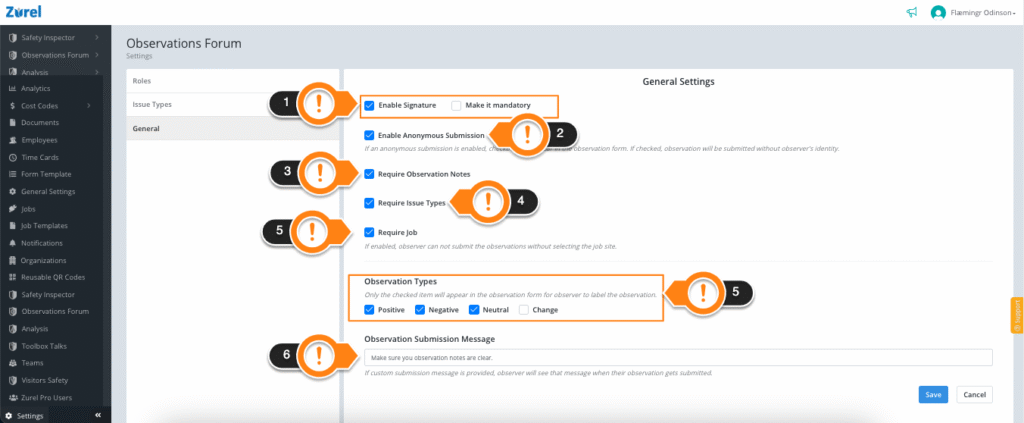
This page has the following items (As labeled above):
1. Enable Signature
This checkbox lets you add a signature panel for the observer in their observation form. Selecting the Make it Mandatory checkbox makes signing the form mandatory before submission.
2. Enable Anonymous Submission
This checkbox lets you add a Submit Anonymously option to the observation form. The observer can check this option to submit their observation without revealing their identity.
3. Require Observation Notes
This checkbox lets you make adding observation notes into the form mandatory for the submitter.
4. Require Issue Types
This checkbox lets you make adding issue types into the form mandatory for the submitter.
5. Require a Job
This checkbox lets you make adding a job to the form mandatory for the submitter.
6. Observation Types
This item lets you add observation types to the observations form. It has the following categories of observation types:
- Positive
Checking this box lets the form submitter categorize their observation as a positive one. - Negative
Checking this box lets the form submitter categorize their observation as a negative one. - Neutral
Checking this box lets the form submitter categorize their observation as a neutral one. - Change
Checking this box lets the form submitter categorize their observation as something that has been changed.
6. Observation Submission Message
This message box lets you add text that will be displayed to the form submitter right after the form is submitted.