
Setting Up Template Guides and Line Item Instructions for ScopeMaker
This guide explains how to add instructional guides to a template in ScopeMaker. These guides help standardize scope language, reduce clarification questions, and provide clear direction to anyone creating documents from the template.. This ensures every project starts with consistent instructions, expectations, and examples—helping teams avoid misunderstandings and rework.
Steps:
- Go to the Bid Packages workspace.
- In the left navigation, click Library → Templates.
The Templates list opens. - Select the template where you want to add instructions.
The Template Preview opens.
Add a Guide for the Entire Template
Use a template-level guide to provide overall direction, standards, or usage instructions.
- In the Template Preview, locate the right-side toolbar.
- Click the Guides icon.

- Click the Edit (Pen) icon as shown in image above.
- Enter your template-level instructions in the box.
You can include formatting such as bold text, bullet points, or do/don’t examples. - Click Save.
The guide is now attached to the entire template and will be visible to users when they work on the documents created from this template.
Add a Guide to a Specific Line Item
Use a line item guide to clarify expectations for a particular line item content.
- In the Template Preview, click the line item where you want to add instructions.
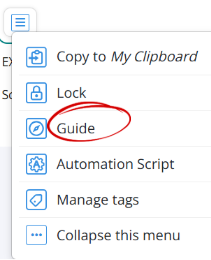
- You will see line item’s Actions Menu as shown in the image above.
- Select Guide from the menu.
- Enter the line item specific instructions.
- Click Save.

- A guide indicator icon will appear next to that line item, showing that instructions are attached.
The guide is now attached to that specific line item and will be visible to users when they work on documents created from this template.
💡 Tip:
- Use template-level guides for overall bidding rules, writing standards, and general scope expectations.
- Use line item guides for specific do/don’t examples or clarifications that apply only to that section.
BP-058