
SI-PDF Report Page
Safety Inspector – PDF page lets you decide which inspection items to be displayed in the PDF report. Only items that have been checked on this page are printed in the PDF.
This page can only be accessed by Admin and Safety Managers.
You can navigate to this page from the Zurel web app root menu by selecting Settings > Safety Inspector>Job Site Inspections> PDF Report
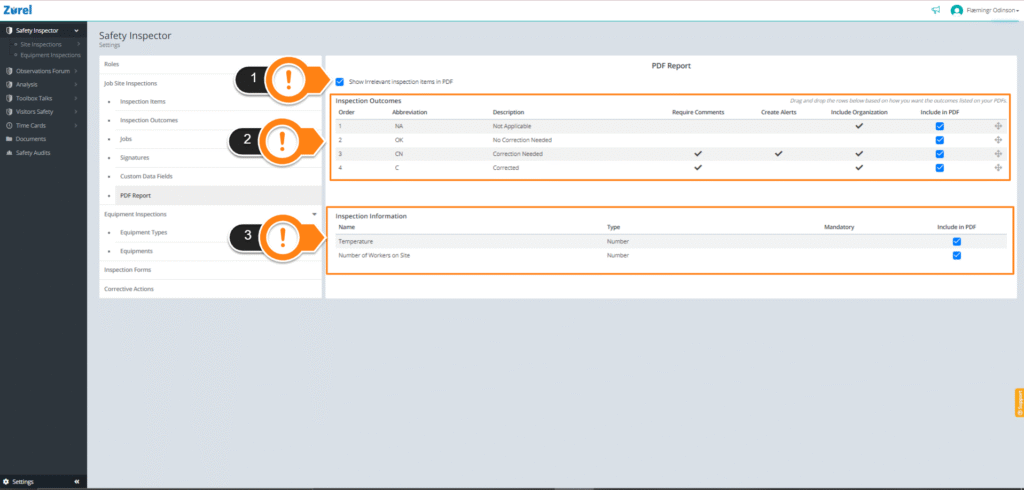
This page has the following items (as labeled above):
1. Show Irrelevant inspection items in PDF
This checkbox lets you show inspection items that were made irrelevant in the inspection report PDF.
2. Inspection Outcomes
This table lists the inspection outcomes that can be included in the PDF report and has the following columns:
- Order
The order in which the inspection outcomes will be displayed in the report. You can change the order by clicking and dragging the items within the table. - Abbreviation
The short form names of the outcomes. - Description
The full name and the description of the outcomes. - Require Comments
The checks on this column indicate if the user has to provide a comment for the inspection outcome. - Create Alerts
The checks on this column indicate if the outcome will display alert icons on that item or the form itself. The alerts let the user know if something is wrong with the inspection item. - Include Organization
The checks on this column indicate if the responsible party for the inspection outcome is supposed to be in the form. - Include in PDF
The checkboxes in this column let you select which outcomes to add to the PDF report.
To find out more about inspection outcomes, see the inspection outcomes page guide.
3. Inspection Information
This table lists additional inspection information that can be added to the PDF report. It has the following columns:
- Name
The name of the additional item. - Type
The type of the item. - Mandatory
The checks in this column indicate if the item is mandatory in the inspection form. Mandatory information must be filled out before submitting the form. - Include in PDF
The checkboxes in this column let you select which information fields to add to the PDF report.
To know more about the additional information you could add to your reports, see the custom data fields page guide.